


EOOEIES
4.6129.00 Reviews
App Specs
- Version
- 1.0.4
- Updated On
- License
- Free
- Downloads
- 50,000+
- Developer
- EOOEIES
- Categories
- Tools
- Platform
- Android
Screenshots
 Analysis by AppCompare
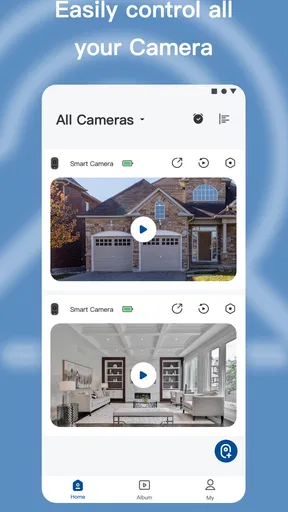
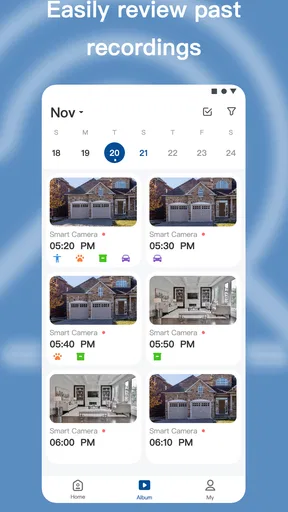
When I look at a home-camera app, I do not judge it only by whether a live image appears on the phone. I also want to know whether I can find that image quickly, understand what I am seeing, and use the app comfortably when I am tired, distracted, or dealing with a poor connection. EOOEIES is a free tools app from EOOEIES designed to connect its security cameras with a smartphone, and my overall impression is that it is most useful when simple remote checking matters more than a long list of advanced controls.
The app has a 4.6 average from around 1.2 thousand ratings, with more than 50 thousand installs. Those figures suggest that it has found a practical audience, but they do not remove the need to test it against your own routine. A camera application can feel excellent for a quick check of a hallway and frustrating for someone who needs detailed event management, extensive device compatibility, or very carefully explained settings.
Using EOOEIES when clarity and quick access matter
I focus this section on the small but important difference between having a camera on a phone and being able to use that view without hesitation. In my experience, clear camera names and a repeatable opening routine make quick checks much less stressful, especially when someone else in the household needs to use the app. The next section looks at how that simple workflow plays out in ordinary moments at home.
Readability and navigation in everyday use
My first priority with a camera app is the path from opening the app to seeing the camera feed. That journey should not feel like operating a control panel. EOOEIES is easier to appreciate when treated as a focused companion for its camera system rather than as a general-purpose security platform. The central task is straightforward: open the app, reach the connected camera, and check what is happening at home.
That focused purpose can be helpful for people who do not want to learn a complicated security interface. A family member who only needs to look at an entrance, check a pet, or confirm that a room is empty may prefer a smaller set of familiar actions over a dashboard filled with technical labels. In my experience, reducing the number of decisions is especially valuable when the phone is being used in a hurry.
At the same time, a simple camera app still needs clear feedback. A user should be able to tell whether the image is live, whether the camera is unavailable, and whether a command has been accepted. If the connection takes time, the difference between loading and failure matters. I recommend setting up the camera while you are calm and on a reliable network, then practicing the basic viewing route before relying on it during an unexpected situation.
The current version is 1.0.4, and that is worth keeping in mind when forming expectations. The app can be perfectly adequate for its main purpose while still feeling less mature than a long-established smart-home platform. I would not choose it solely because I want a polished command center for cameras, lights, locks, and sensors. Its appeal is narrower: it puts EOOEIES security-camera monitoring on a phone without charging an upfront purchase price.
Worth Reading Before You Choose

EA SPORTS FC Mobile 26 Is a Bigger Football Game, but It Takes Time

Flipboard Shows What News Apps Must Do Beyond the Feed

Switching to Android Auto Means Rethinking Your Driving Routine

Google Calendar Makes a Crowded Week Easier to Manage

Ludo King Makes the Most of the Minutes Between Plans

Baby Panda World Brings Quick Play to Modern Phones, but Its Game Library Feels Busy
Making the visual feed easier to use
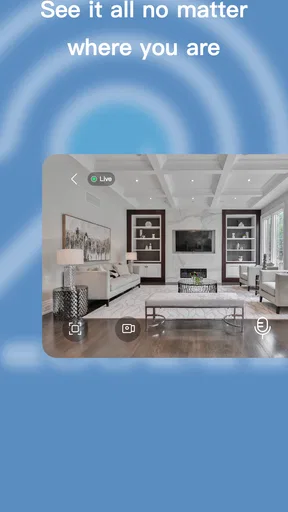
Camera viewing is a visual task, so the quality of the experience depends on more than the buttons around the image. Glare, a small phone screen, dim surroundings, or a user with reduced vision can all make a live feed harder to interpret. I found that the most useful habit is to use the app for a defined question: “Is the front door closed?” or “Is the dog in the room?” A focused check is easier than trying to study every detail in a busy scene.
For a household with several people using the same camera, I would agree on a small routine. Keep the phone brightness at a comfortable level, open the camera before moving around the house, and avoid judging a dark feed too quickly. If the image is visually crowded, changing the physical camera position may help more than searching through the app for a display option. A camera pointed at a bright window, for example, can produce a less useful view regardless of how clean the application looks.
People who rely on large text, magnification, or a screen reader should test the actual controls on their own phone before making EOOEIES the only way to monitor the home. I can recommend checking whether the camera name, status messages, and primary controls are announced in a sensible order. I would not assume that a clean-looking interface automatically provides excellent spoken feedback. The practical test is whether the user can identify the right camera and understand its current state without assistance.
Motor comfort and sensory load
Remote monitoring often involves repeated taps, small controls, and holding a phone steady while watching movement. That can be tiring for someone with limited dexterity, tremors, joint pain, or reduced reach. EOOEIES is more approachable when the user only needs occasional viewing, but the experience may be less comfortable if monitoring requires frequent interaction or precise control.
A useful workaround is to place the phone on a stable surface during longer checks rather than holding it in the air. I also prefer naming cameras according to their location instead of using vague labels. “Side entrance” is easier to recognize than a device code, particularly for someone who is rushing or sharing access with another person. Clear naming is a small setup decision, but it reduces motor and cognitive effort every time the app is opened.
Sensory needs vary widely. Some users want a quiet visual check without alerts or sounds, while others need a noticeable indication that the connection has changed. Since the available experience can depend on the camera and phone configuration, I would test the app in the conditions where it will actually be used: at night, in a bright room, with sound muted, and with the phone’s accessibility settings enabled. That trial reveals more than a brief daytime check.
For someone with photosensitivity or discomfort from rapidly changing images, a camera feed can be unpleasant when there is movement, flickering light, or a busy scene. The safest approach is to avoid staring at the display unnecessarily and to position cameras away from flashing sources where possible. This is not a special EOOEIES feature; it is a sensible way to make any live-camera workflow less demanding.
Situational access beyond the living room
The strongest reason to use a smartphone camera app is that the user may not be at home. I can imagine opening EOOEIES while at work to check whether a delivery area is clear, while traveling to confirm that a room is empty, or from upstairs when a sound comes from the ground floor. These are small moments, but quick access can prevent unnecessary trips and provide reassurance.
A realistic example is a parent leaving home while an older relative remains inside. The parent can use the camera to check a shared area without repeatedly calling or entering the room. In that situation, the app is not replacing conversation or care; it is a low-effort visual check. The best setup would use a camera angle that shows the relevant space without exposing private areas, and the household should agree on who is allowed to view it.
Another useful scenario involves a user who cannot easily move around the home. A phone-based view may provide more independence if the camera is placed carefully and the app can be opened without complicated steps. That benefit depends on the whole arrangement, not just the software. The camera must cover the right location, the phone must remain usable, and another person may need to help with the initial installation.
Travel introduces a different trade-off. A camera app is only useful when the camera and phone can communicate, so I would never treat it as the sole plan for urgent safety situations. Before leaving, check the camera from outside the home and make sure the intended user knows the basic viewing process. If the app is being used to check on a pet, child, or vulnerable person, a second contact method is still sensible.
Where EOOEIES fits among the usual alternatives
The usual alternative is a broader smart-home application that supports cameras from several brands along with alarms, lights, locks, and automation. That kind of platform can be a better choice for a home already built around different manufacturers. It may also offer a more unified way to manage a large collection of devices. EOOEIES makes more sense when the household is already using EOOEIES cameras and wants the direct companion rather than another layer of software.
A second alternative is viewing a camera through a web dashboard or a computer program. A desktop can be more comfortable for extended observation, especially for someone who needs a larger display. The phone app wins for portability, but it is not automatically the best tool for a security desk, a caregiver who monitors several feeds, or anyone who needs to compare multiple views for a long period.
There is also the option of using a camera manufacturer’s more feature-heavy application. That may suit people who want extensive history, detailed notifications, integrations, or advanced account controls. I would choose that route if those functions are central to my routine. I would choose EOOEIES when the priority is a direct mobile connection to the matching camera system and the household does not need a broad ecosystem.
The free price removes an initial purchase barrier, which is useful for trying the basic experience. However, the app includes in-app purchases ranging from $5.99 to $149.99 per item. I would inspect any purchase screen carefully before confirming it and decide in advance which functions are genuinely necessary. A free download is not the same as a completely cost-free long-term setup, so this matters for anyone managing a strict budget.
Practical setup habits that improve accessibility
The first habit I recommend is to create a camera layout that matches the way the home is used. If the most important view is the entrance, that camera should be easy to recognize and reach. Do not organize devices according to installation order if that forces the user to remember technical details. Location-based names reduce memory demands and make the app more usable for guests, older adults, and people who are under stress.
The second is to test the app with the least confident user in the household. The person who installs a camera often knows every step, while the person who needs to check it later may not. Ask that second user to open the app, identify the correct camera, interpret the image, and recover from an interrupted connection. Any hesitation reveals a training or setup problem before it becomes an emergency.
The third is to design around the user’s real phone habits. A person who uses one hand may need the device positioned differently from someone who uses voice access or magnification. Someone with hearing loss may need visual confirmation rather than relying on an audio cue. Someone with low vision may need a larger screen. EOOEIES can be part of an inclusive arrangement, but the phone settings, camera placement, and household routine have to support the same goal.
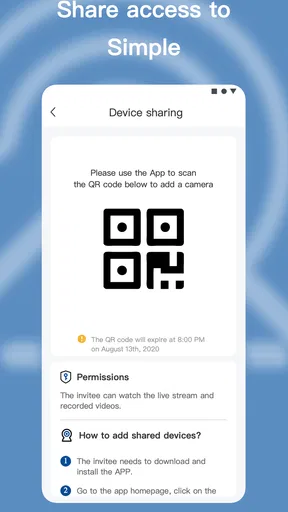
I also recommend a privacy check before sharing access. A camera aimed at a private room can create discomfort even when the intention is helpful. Use the narrowest view that answers the practical question, and explain to everyone affected what the camera is for. This is especially important in multigenerational homes, shared accommodation, and care situations where one person may have less control over the setup.
Remaining barriers and who should skip it
The main limitation is that a camera companion app cannot solve every accessibility problem created by the physical installation. If the camera is mounted too high, aimed at glare, or unable to show the needed area, a better interface will not fix the situation. Installation planning is therefore part of the review: choose a position that provides useful information without requiring the user to move constantly or ask someone else to adjust it.
I would also be cautious if reliable monitoring is critical and the household has no backup. A phone app depends on the camera, the network, the phone, and the user’s ability to interpret the result. For urgent security decisions, a live view should be treated as one source of information, not proof that every part of the home is safe. People who need professional monitoring or a highly redundant setup should look at more specialized options.
Users who want one application for many brands may be better served by a mature smart-home platform. The same is true for someone who expects extensive automation, detailed event organization, or a computer-first monitoring workflow. EOOEIES is not the obvious choice for those needs. Its narrower focus is a strength for a matching camera setup, but a limitation for a mixed-device household.
Budget-conscious users should think about the in-app purchase range before committing to the wider system. The application itself is free and rated for Everyone, and it requires Android 7.0 or later, but the presence of paid items means the total experience may depend on which functions the user chooses. I would install it for a basic trial, avoid purchasing immediately, and confirm that the core viewing routine works for every intended user.
An inclusive verdict for everyday home monitoring
After using EOOEIES as a focused camera companion, I see its best quality in its direct purpose. It can give a household a portable way to check an EOOEIES security camera, and that can support independence when the camera is placed thoughtfully and the app is easy for the actual user to reach. The experience is especially suitable for quick checks rather than constant professional observation.
Its accessibility story is practical rather than complete. People with different abilities may find it useful, but they should test text visibility, control size, status feedback, and screen-reader behavior on their own devices. I would not promise that every need is covered, and I would not treat the app as a substitute for careful camera placement, privacy agreements, or a backup plan.
My recommendation is simple: choose EOOEIES when you want a straightforward phone-based view of its matching cameras, and skip it when you need a broad, deeply integrated security platform. The free entry point makes experimentation easy, while the paid items deserve attention before spending. For a small household that values quick visual reassurance, it is a sensible tool; for complex monitoring or demanding accessibility requirements, compare it with a more established alternative first.
Developed by EOOEIES, the app is available to an Everyone audience and runs on Android 7.0 or later. I would begin with one camera, one primary user, and one clearly defined daily task. If that person can open the app, find the right view, understand the result, and recover from a connection problem without help, the setup is doing its job. That is the standard I would use before expanding it to the rest of the home.
Pros
- Simple interface makes core features easy to find.
- Lightweight design should work well on many Android devices.
- Useful for quick access without a steep learning curve.
- Clean layout keeps navigation relatively distraction-free.
- Regular updates may improve compatibility and stability over time.
Cons
- Limited information is available about the app’s developer and support.
- Some features may require permissions that privacy-conscious users dislike.
- Performance can vary depending on device age and operating system version.
- The app may offer fewer advanced options than established alternatives.
- Availability and functionality could differ between Android and iOS versions.
FAQs for EOOEIES
What is EOOEIES and what can I use it for?
EOOEIES is an app whose exact purpose and available tools may depend on the version, platform, and region where it is offered. Before downloading, review its store description and screenshots to confirm that it provides the functions you need. During testing, users should also explore the main menu, account options, settings, and any introductory tutorial so they understand how the app is organized.
Is EOOEIES free to download and use?
EOOEIES may be available as a free download, but that does not always mean every feature is free. Some apps include advertising, optional purchases, subscriptions, or premium tools that become visible after installation. Check the Google Play Store or Apple App Store listing for pricing information, billing terms, and trial conditions. If a subscription is offered, read the renewal and cancellation details carefully before confirming payment.
Is EOOEIES safe and trustworthy?
Before installing EOOEIES, users should verify that the download comes from the official Google Play Store or Apple App Store rather than an unknown website or modified package. Check the developer name, recent reviews, update history, and requested permissions. Pay particular attention to access involving contacts, location, photos, microphone, or notifications. Only grant permissions that are clearly necessary for the features you intend to use.
Which devices and operating systems support EOOEIES?
Compatibility can vary between Android and iOS, and older phones may not support the latest release. Open the official store page to check the minimum Android or iOS version, required storage, and device availability. It is also worth confirming whether EOOEIES requires an internet connection, works on tablets, or offers the same features on both platforms, since some functions may differ by operating system.
Does EOOEIES require an account or an internet connection?
Whether you need to create an account depends on how EOOEIES handles its features and user data. Some functions may be available immediately, while synchronization, saved content, personalization, or online services may require registration. A stable internet connection may also be necessary for setup, updates, advertisements, or cloud-based tools. Review the sign-in screen and privacy policy before entering personal information or linking another account.


